8GB Internet Data (15 Days) for only PhP110
We have been using the GOSURFBE34 for our data needs for the last five years and we were all at loss as the promo code is no longer valid in the Globe subscription.
With the end of GoSAKTO promo codes, we provide you an alternative to GOSURFBE34 at a higher cost but with more internet data and unlimited text to all network! Yes, we find ways. This is working as of this posting, 3 January 2024.

You will need:
GlobeOne app (download) - Installed. Make sure that you are registered and can log-in via GlobeOne app.
Internet access to use the GlobeOne app.
Load of Php110
Procedure:
1. Open and log-in to your GlobeOne app. You will need a wifi or a hotspot for it to work. You CANNOT access the app via USSD *143#. If you still have Globe rewards, you might want to redeem the SURF100MB (1 day) for only 2pts to have internet to log-in to GlobeOne app.
2. In the homepage of the app, click the BUY PROMOS icon.
3. Input/choose your mobile number and click CHOOSE ACCOUNT.
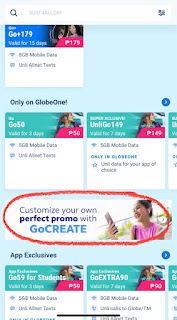
4. Scroll down to the different promos until you see the banner, Customize your own perfect promo with GoCREATE. Click the banner.
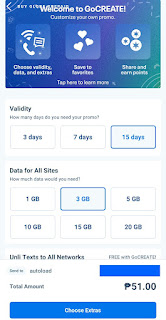
5. Select 15 days under Validity and select 3GB under the Data for All Sites.
6. This promo includes FREE Unli Texts to All Network and costs Php51. Click Choose Extras. In the Extras page, no need to select anything as they are NOT free of charge.
7. Click the Review and Pay button. In the next page, click the heart icon to add this promo to favorites so you can easily select it next time you register. Select the Charge to Own Load at the bottom of the page and click SUBSCRIBE. Now you have created 3GB for only Php51 promo.
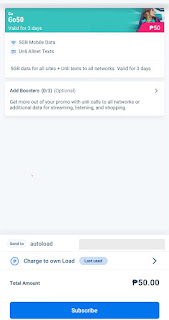
8. Click again the Buy Promos and choose your mobile number. Select the Go50 (valid for 3 days) under the Only on GlobeOne promos.
9. In the checkout page, select Charge to Own Load and hit SUBSCRIBER. You now have 5GB+3GB+Unli AllNet Texts in your GoCreate promo for 15 days! This only costs PhP110 in all. Comment below if it's working!

Enjoy and Share this post via the social toolbars below.
Use the comment form below for your feedback and queries.
Read More
With the end of GoSAKTO promo codes, we provide you an alternative to GOSURFBE34 at a higher cost but with more internet data and unlimited text to all network! Yes, we find ways. This is working as of this posting, 3 January 2024.
How to Have an 8GB Internet Data with Unli All Network Texts for 15 days?

You will need:
GlobeOne app (download) - Installed. Make sure that you are registered and can log-in via GlobeOne app.
Internet access to use the GlobeOne app.
Load of Php110
Procedure:
1. Open and log-in to your GlobeOne app. You will need a wifi or a hotspot for it to work. You CANNOT access the app via USSD *143#. If you still have Globe rewards, you might want to redeem the SURF100MB (1 day) for only 2pts to have internet to log-in to GlobeOne app.
2. In the homepage of the app, click the BUY PROMOS icon.
3. Input/choose your mobile number and click CHOOSE ACCOUNT.
4. Scroll down to the different promos until you see the banner, Customize your own perfect promo with GoCREATE. Click the banner.
5. Select 15 days under Validity and select 3GB under the Data for All Sites.
6. This promo includes FREE Unli Texts to All Network and costs Php51. Click Choose Extras. In the Extras page, no need to select anything as they are NOT free of charge.
7. Click the Review and Pay button. In the next page, click the heart icon to add this promo to favorites so you can easily select it next time you register. Select the Charge to Own Load at the bottom of the page and click SUBSCRIBE. Now you have created 3GB for only Php51 promo.
8. Click again the Buy Promos and choose your mobile number. Select the Go50 (valid for 3 days) under the Only on GlobeOne promos.
9. In the checkout page, select Charge to Own Load and hit SUBSCRIBER. You now have 5GB+3GB+Unli AllNet Texts in your GoCreate promo for 15 days! This only costs PhP110 in all. Comment below if it's working!


Option 2 (Php85):
5GB data
You can select 15 days under validity and select 5GB under Data for All Site for only Php85. This has no unli allnet texts.

Enjoy and Share this post via the social toolbars below.
Use the comment form below for your feedback and queries.
5GB Internet Data for 15 Days for Only PhP84 (Globe)
Internet data consumption has been demanding ever since this era of COVID-19 pandemic. Now Globe is offering Go50 for Students (exclusively available in GCash app) which consists of:

Read More
*5GB open data access*1GB data for GoLearn&Work Apps (Youtube, Google Suite, Wikipedia, Coursehero, Canva, Zoom, WhatsApp, Telegram and Spotify)*1GB GoSurf Free Wifi and unlimited all-net text*3 months Free online classes with Shaw Academy*1 Free Gcash voucherValid for 3 days
This Go50 for students is so sulit, wouldn't you agree? Though it is only available via GCash App, you can also register using the keyword Go50 and send to 8080. But Go50 is without the add-on of 1GB for GoLearn&Work apps, and that is still 1GB data loss! Better purchase using the GCash app and thank me later. If you do not have GCash account yet, register here and get Php70 worth of freebies (even if you are a Smart/TNT/Sun subscriber).

How to Extend the Validity of Go50 for Students?
Now, we will extend this 5GB data allocation for 15 days if you think that it may be a lot already. Remember, we were used to having only 2-3GB per month under these GOSAKTO promos. Only the 5GB data will be extended, the 1GB allocation for GoLearn&Work and unlitext will expire within 3 days.
To extend the validity of Go50,
1. Make sure you availed the Go50 or the Go50 for Students. (Php50 via keyword or via GCash)
2. Send GOSURFBE34 to 8080. (Php34)
3. Wait for the confirmation and enjoy 5GB data for 15 days.
Cost: Php84
You can also have additional 5GB data for only Php50 by availing Go50 or the Go50 for Students again. So, that will be 10GB data for 15 days for only Php134.
Enjoy and Share this post via the social toolbars below.
Use the comment form below for your feedback and queries.
Use the comment form below for your feedback and queries.
How to Make Your TV Plus to Affordabox?
Since the shutdown of ABS-CBN and us still being in community quarantine, you might be needing additional channel/s for your TV viewing time at home. A side note, instead of watching TV, try learning new skills while you are at home. Paint, cook, know the internet, improve your conversation skills, draw, make video clips, etc. It may be a source of income in the future.
Read More
But for now, let's start getting additional channel for your TV Plus box and make it to an Affordabox. You must have a TV Plus to work on.


How to Make Your TV Plus to be an Affordabox?
Procedure:
1. From your TV Plus, go to GMA Channel.
2. Scan. Make sure it's on GMA Channel.
3. Once scanning is 100% complete, press OK.
4. Turn off your TV.
5. Turn off your TV Plus. Wait for 10-15 seconds, then turn your TV Plus and TV again.
6. Done.

You will have the following new channels:
a. Heart of Asia
a. Heart of Asia
b. GMA1Seg
c. 5
Enjoy and Share this post via the social toolbars below.
Use the comment form below for your feedback and queries.
Use the comment form below for your feedback and queries.
Sulit Unlimited Internet for 3 or 5 Days (Sun)
Promos
,
Sun Cellular
,
Telcos
In this time of work from home, Netflix chill, and Tiktok sensation, when you believed that unlimited internet no longer exist for the prepaid subscribers, I suddenly came across these two Sun Cellular unlimited internet promos. Yes, they are unlimited but with caveat. All along I thought that unlimited internet these days equals 800MB capping. So, when work from home becomes a necessity, I relied to the usual consumable data tricks that I am used to. But everyday participation to meetings using Zoom MS Teams, and Google Meet while streaming Youtube in the sideline, depleted my wallet for 1GB or 2GB data use each day. Arat na. Let me introduce to you the Non-Stop Surf 50 and the Unlimited Surf 100.
To add, I am using these promos in my openline modem B315S-936. You can also use this in your PLDT Home Prepaid Wifi using Sun SIM. You can also use a pocket wifi or simply use your phone as hotspot.

How to Register?
A. Non-Stop Surf 50 (Php50)
Provision:
From Sun Cellular website, Non-stop surf 50 is for Non-Stop surfing and 100MB open data access. But once registered, you can browse and download large files. However, you cannot watch Netflix using this promo (you might need a VPN to do this). No torrent download. If a site won't load, just turn off-on your modem.Promo is valid for 3 days.
To register:
1. Send NONSTOP50 to 247 and wait for confirmation.
B. Unlimited Surf 100 (Php100)
Provision:
It was known in prints that this unlimited internet has 800MB cap per day under their FUP. Once 800MB usage is reached, your internet speed will throttle to 2G speed but speed will reset at 12AM of each day. But this is not so, once registered, you can watch Netflix, or do anything you want in the internet except torrent downloading. Unlimited is real!Promo is valid for 3 days.
To register:
1. Send UNLI100 to 247 and wait for confirmation.
Note that:
1. The promo is prone for SIM blocking especially the Non-Stop 50 if bandwith usage is abused. So better limit your daily use to 3-4 GB per day to avoid being blocked. Once blocked, you cannot access the internet thus forfeiting your remaining internet days from your registered promo. SIM unblocking every midnight is a case to case basis. Lucky if your SIM will unblock at midnight.
2. Better have a couple of Sun SIM in rotation for promo registration. In case your SIM is blocked, you have another SIMs at hand for new promo registration.
3. If you really need to download big files such as 20GB and above, expect SIM block. But you can still download them before your SIM becomes blocked. Sacrificing your SIM and remaining internet validity.
Use the comment form below for your feedback and queries.
How to Still Enjoy Free BPI Mobile Transfers?
On May 30, 2019, the Bank of the Philippine Islands announced that they will be implementing new fees starting July 1, 2019 for mobile transfer to unenrolled third party accounts i.e. BPI to BPI accounts (PhpP10) and mobile transfer to other banks via InstaPay (PhP50). To be honest, I opened an account with them way back in 2012 because they were the only bank which allows over-the-counter deposits to regional BPI banks FREE of charge. But recently, they are charging PhP50 for every interbranch deposit. Moreover, they will be imposing these new mobile transfer fees starting July! Such another burden BPI.
But there are still ways to enjoy the BPI mobile transfer service for FREE, most especially to those online sellers who utilize BPI transfer as mode of payment. I will be sharing with you on how to use the BPI mobile transfer despite the new fee implementation and let your business thrive after this new fee is implemented.

How to Still Enjoy FREE BPI Mobile Transfers?
A. Transfer via QR
For now,this is the most efficient way to transfer money for BPI to BPI accounts. I recommend using this method since it's error-proof. We need not worry of inputting the wrong account number and it's also faster as compared to the traditional way of typing the account numbers.
To do:
1. Log-in to your account via BPI mobile app or the webpage version (their interface are now similar by the way). Go to Other Services} QR Generator.
2. Select the account where money will be received and type a nickname for it. Any name will do.
3. Click the Generate button and wait for the QR code to be generated. Once finished, click the Save to Device. Now, the saved picture of your account QR code will be used to allow your family, friends and customers to send you money from their BPI accounts. So, whenever you request payment from other people, just send the picture of the QR code.
4. For them to send you money, let them use the Transfer via QR button from the homepage of the mobile app. Choose import from Gallery.


B. Enroll your other accounts and third party accounts
Though the transfer via QR code is the easiest method, it is only FREE for a limited period of time (until BPI public notice). Once fee is implemented to Transfer via QR, our only option for FREE mobile transfer is enrolling third party accounts by visiting a branch near you or by mailing signed Third Party Enrollment Form. You can download the Third Party Enrollment Form here. Follow the steps below to enroll third party accounts.

In the long run, we can still enjoy the FREE transfer if we enroll the accounts; but this is quite tedious especially to the online buyers. Whenever they want to use the service to a new online seller, they will have to enroll the account first before they can make payment. I think this is a wrong move for BPI. Surely, people will find another bank that do this for FREE all the way! Hello BDO and LBP...
Enjoy and Share this post via the social toolbars below.
Use the comment form below for your feedback and queries.
Read More
But there are still ways to enjoy the BPI mobile transfer service for FREE, most especially to those online sellers who utilize BPI transfer as mode of payment. I will be sharing with you on how to use the BPI mobile transfer despite the new fee implementation and let your business thrive after this new fee is implemented.
How to Still Enjoy FREE BPI Mobile Transfers?
A. Transfer via QR
For now,this is the most efficient way to transfer money for BPI to BPI accounts. I recommend using this method since it's error-proof. We need not worry of inputting the wrong account number and it's also faster as compared to the traditional way of typing the account numbers.
To do:
1. Log-in to your account via BPI mobile app or the webpage version (their interface are now similar by the way). Go to Other Services} QR Generator.
2. Select the account where money will be received and type a nickname for it. Any name will do.
3. Click the Generate button and wait for the QR code to be generated. Once finished, click the Save to Device. Now, the saved picture of your account QR code will be used to allow your family, friends and customers to send you money from their BPI accounts. So, whenever you request payment from other people, just send the picture of the QR code.
4. For them to send you money, let them use the Transfer via QR button from the homepage of the mobile app. Choose import from Gallery.


B. Enroll your other accounts and third party accounts
Though the transfer via QR code is the easiest method, it is only FREE for a limited period of time (until BPI public notice). Once fee is implemented to Transfer via QR, our only option for FREE mobile transfer is enrolling third party accounts by visiting a branch near you or by mailing signed Third Party Enrollment Form. You can download the Third Party Enrollment Form here. Follow the steps below to enroll third party accounts.
In the long run, we can still enjoy the FREE transfer if we enroll the accounts; but this is quite tedious especially to the online buyers. Whenever they want to use the service to a new online seller, they will have to enroll the account first before they can make payment. I think this is a wrong move for BPI. Surely, people will find another bank that do this for FREE all the way! Hello BDO and LBP...
Enjoy and Share this post via the social toolbars below.
Use the comment form below for your feedback and queries.
Grab 7th Anniversary Bundle (PhP700+ SM Voucher for Only PhP7)
Grab gives back on its 7th anniversary! With only PhP7 purchase via GrabCredit, you get PhP700+ worth of vouchers from SM. This promo is valid from May 31 to June 6, 2019.
Included in the Anniversary Bundle:
a. PhP100 off Grab ride - minimum PhP150 fare in Cebu and Metro Manila. Valid until June 30 '19.
b. PhP60 discount in the SM store with a minimum purchase of PhP600.
c. Free SM Advantage card - redemption until June 10, 2019.
d. 15% off Watsons Label Products and 30% off on Watson's Generics. PhP30 off on new purchase of Watsons Card.
e. PhP250 off The Body Shop with minimum single receipt purchase of PhP1500. Valid until December 30, 2019.
f. Php50 off Goldilocks single receipt purchase of PhP500.
g. Brownies from Brownies Unlimited. Valid until July 31, 2019.

How to Redeem Grab Anniversary Bundle for Only PhP7?
1. Download and install the Grab App from Playstore or AppStore. Use the code GRABVYGO3M8I to get PhP50 off on your first ride (first timers only).
2. Link your mobile number. You need to link it so drivers can call you whenever they got lost finding your pinned location.
3. Open the app and cash-in PhP10 to your GrabCredits. You can Cash-in via the following:
a. In Store: SM Business Center, 711, Cebuana
b. Bank Methods: BPI Express Online
c. Cards and Wallets: Debit and Credit Cards with MasterCard, Visa, Amex, UnionPay or JCB logo.
d. Driver: top-up and pay through the Grab driver.
I usually use the cards and wallets method using my Landbank card. No extra charge is incurred.
4. Now you have PhP10, go to the Grab homepage in your app and look for the Exclusive SM deals section and from there, shop the Grab Anniversary Bundle for only PhP7.
5. Check the My Rewards tab and you will have the same coupons as below.

Enjoy and Share this post via the social toolbars below.
Use the comment form below for your feedback and queries.
Read More
Included in the Anniversary Bundle:
a. PhP100 off Grab ride - minimum PhP150 fare in Cebu and Metro Manila. Valid until June 30 '19.
b. PhP60 discount in the SM store with a minimum purchase of PhP600.
c. Free SM Advantage card - redemption until June 10, 2019.
d. 15% off Watsons Label Products and 30% off on Watson's Generics. PhP30 off on new purchase of Watsons Card.
e. PhP250 off The Body Shop with minimum single receipt purchase of PhP1500. Valid until December 30, 2019.
f. Php50 off Goldilocks single receipt purchase of PhP500.
g. Brownies from Brownies Unlimited. Valid until July 31, 2019.
How to Redeem Grab Anniversary Bundle for Only PhP7?
1. Download and install the Grab App from Playstore or AppStore. Use the code GRABVYGO3M8I to get PhP50 off on your first ride (first timers only).
2. Link your mobile number. You need to link it so drivers can call you whenever they got lost finding your pinned location.
3. Open the app and cash-in PhP10 to your GrabCredits. You can Cash-in via the following:
a. In Store: SM Business Center, 711, Cebuana
b. Bank Methods: BPI Express Online
c. Cards and Wallets: Debit and Credit Cards with MasterCard, Visa, Amex, UnionPay or JCB logo.
d. Driver: top-up and pay through the Grab driver.
I usually use the cards and wallets method using my Landbank card. No extra charge is incurred.
4. Now you have PhP10, go to the Grab homepage in your app and look for the Exclusive SM deals section and from there, shop the Grab Anniversary Bundle for only PhP7.
5. Check the My Rewards tab and you will have the same coupons as below.

Enjoy and Share this post via the social toolbars below.
Use the comment form below for your feedback and queries.
Book Your Staycation with OYO
We now get more options to book our staycation getaways thru OYO hotels. If you are looking for cheap hotels to spend the weekends or you simply want to have meh time, try booking with OYO hotels. It is a hotel chain based in India so, you won't regret availing of their service. You can find hotels as cheap as Php200 per night! And theirs are not just room, their rooms are like suite with clean linens and fast WIFI service. Some room even let you cook!

How to Book a Room in OYO?
1. Download an install the OYO app via Playstore or AppStore. Register and use the code YCHEB379JQ to earn PhP100 discount. You will need a working mobile number to retrieve your booking details.
2. Open the OYO app and search your location to check the available hotels. You will also see discounted hotels under the Recommended For You section. Usually, the cheapest hotels are visible there. Some hotels offer FREE use of swimming pool, gym area, etc.
3. When you have decided on your preferred room and dates of stay, just click the Book Now.
4. You have the option to pay at the hotel when you arrive or your use your credit card.
Enjoy and Share this post via the social toolbars below.
Use the comment form below for your feedback and queries.
Read More
How to Book a Room in OYO?
1. Download an install the OYO app via Playstore or AppStore. Register and use the code YCHEB379JQ to earn PhP100 discount. You will need a working mobile number to retrieve your booking details.
2. Open the OYO app and search your location to check the available hotels. You will also see discounted hotels under the Recommended For You section. Usually, the cheapest hotels are visible there. Some hotels offer FREE use of swimming pool, gym area, etc.
3. When you have decided on your preferred room and dates of stay, just click the Book Now.
4. You have the option to pay at the hotel when you arrive or your use your credit card.
Enjoy and Share this post via the social toolbars below.
Use the comment form below for your feedback and queries.
Promo Code: PhP155 Off on Army Navy Order in FoodPanda
Satisfy your craving in Army Navy via FoodPanda. They are giving PhP155 off with minimum order of PhP310. That's 50% off savings! Army Navy is celebrating their anniversary month and is offering discounts to FoodPanda costumers. FoodPanda is a food service delivery in Metro Manila and they only charge PhP35 for every delivery. FoodPanda delivery service is cheaper than GrabFood and has a wider options of restaurants.

How to Avail PhP155 Off in Army Navy via FoodPanda?
1. Register to FoodPanda if you still do not have FoodPanda account. Use my link to have PhP180 off on your first order. It will only take a one minute to do this.
2. Once log in, search for Army Navy store and order your food to cart (it must cost PhP310 up). Try the Chicken Burrito and the Cheese Quesadilla (Total: PhP335).
3. View your Cart and click the "Do you have a voucher?" link. Input ARMYPANDA.
4. Indicate your address, contact number in case your driver got lost, and your mode of payment. They accept cash by the way. Place your order.
5. Wait for the restaurant to accept your order, your driver to pick it up and deliver it to your address. You can view the progress of your order in the website or in the app. They will also send email update to your registered email.
Enjoy and Share this post via the social toolbars below.
Use the comment form below for your feedback and queries.
Read More
How to Avail PhP155 Off in Army Navy via FoodPanda?
1. Register to FoodPanda if you still do not have FoodPanda account. Use my link to have PhP180 off on your first order. It will only take a one minute to do this.
2. Once log in, search for Army Navy store and order your food to cart (it must cost PhP310 up). Try the Chicken Burrito and the Cheese Quesadilla (Total: PhP335).
3. View your Cart and click the "Do you have a voucher?" link. Input ARMYPANDA.
4. Indicate your address, contact number in case your driver got lost, and your mode of payment. They accept cash by the way. Place your order.
5. Wait for the restaurant to accept your order, your driver to pick it up and deliver it to your address. You can view the progress of your order in the website or in the app. They will also send email update to your registered email.
Enjoy and Share this post via the social toolbars below.
Use the comment form below for your feedback and queries.
Download Big Files Without Block in Globe or TM
You want to download games or movies, or you need to update your Windows and your Android/Apple phone, yet your unlimited internet in Globe has this Fair Usage Policy? Well, you can download big files now without getting throttled to 2G speed! I have been a Globe user for years and their FUP has been an obstacle for my download days ever since. If you are being like me, here's how you can download big files.

How to Download Big Files Without Being Blocked by Globe/TM?
A. Use Regular Load (no promo)
1. You only need to load around 30php-50php. Make sure you do not have existing registration to promos. If you have, buy an extra Globe/TM SIM for your download activities only.
2. Text SURFALERT OFF to 8080.
3. Start your download. It is advisable to download during off-peak hours (11PM-6AM). You can just start the download before you sleep and let it finish. Just make sure that your regular load is only the amount you want to spend for the download. The download speed during off-peak hours is faster and Globe/TM only charge Php5/15mins. It downloads at 4mbps.
4. Once you are done, send SURFALERT ON to 8080 to make sure that your internet won't consume regular load next time you reload.
B. Use Consumable Internet Promos (Not Unlimited)
1. If you can afford to download using data promos, just send GOTSCOMBOKEA37 to 8080 and you will have 1GB of consumable data for your 1GB download. If you want more data allocation, register again using that promo to have 2GB and so on. It costs PhP37 for every successful registration.
These tips will ensure that your download speed won't throttle to 2G.
Enjoy and Share this post via the social toolbars below.
Use the comment form below for your feedback and queries.
Read More
How to Download Big Files Without Being Blocked by Globe/TM?
A. Use Regular Load (no promo)
1. You only need to load around 30php-50php. Make sure you do not have existing registration to promos. If you have, buy an extra Globe/TM SIM for your download activities only.
2. Text SURFALERT OFF to 8080.
3. Start your download. It is advisable to download during off-peak hours (11PM-6AM). You can just start the download before you sleep and let it finish. Just make sure that your regular load is only the amount you want to spend for the download. The download speed during off-peak hours is faster and Globe/TM only charge Php5/15mins. It downloads at 4mbps.
4. Once you are done, send SURFALERT ON to 8080 to make sure that your internet won't consume regular load next time you reload.
B. Use Consumable Internet Promos (Not Unlimited)
1. If you can afford to download using data promos, just send GOTSCOMBOKEA37 to 8080 and you will have 1GB of consumable data for your 1GB download. If you want more data allocation, register again using that promo to have 2GB and so on. It costs PhP37 for every successful registration.
These tips will ensure that your download speed won't throttle to 2G.
Enjoy and Share this post via the social toolbars below.
Use the comment form below for your feedback and queries.
2GB Consumable Internet Plus 750MB Free Apps Usage for TNT Users (P180^30days)
Promos
,
Talk N Text
,
Telcos
Talk 'N Text subscribers can now enjoy longer validity of their consumable data at a cheaper price. This trick is similar to Globe's Cheapest Consumable 30-and 7-day internet post. Yey, the perk is no longer exclusive for Globe subscribers! This trick is better suitable for your mobile data internet need. I will NOT suggest this to use in your pocket wifi or modem which is usually shared over a number of users. You can now enjoy a month-long internet connection as long as you can manage your daily internet use, setup your mobile data limit in your Android data setting to 3GB and have the notification for 70MB use so that you can track your consumption. I can say that I am a moderate user (Facebook with video streaming, Messenger call/video, Viber, Instagram (IG), 15 mins Youtube, Arena of Valor (AOV), Mobile Legend (ML), Rules of Survival (ROS), Pokemon Go, UCWeb browsing for 30 mins, and my Mobile Banking Apps are my daily apps usage). It won't last for 30 days if you stream movies using this trick i.e. Netflix, iFlix, DramaFever, etc. Also, these TNT promos doesn't have allocations for calls or texts. You can use Facebook Messenger instead.

How to Have 2GB Internet Data Plus 750MB Free Apps for 30 Days for Only PhP180?
Provision:
1. Make sure you have at least PhP180 load in your TNT SIM.
2. Send GAANSURF150 to 4545 and wait for confirmation (PhP150). If 1.5GB internet data and 750MB of tropa apps are enough for you to last in 30 days, you can stop at this step. If you want additional 500MB and 2GB Youtube Access (for 2 days), do Step 3.
3. Send PDATA30 to 4545 and wait for confirmation (PhP30). Also, you may opt to do this step when your remaining MB from your GAANSURF is becoming low, like when you are on your 20th day and your Gaansurf data is only 200MB, you can then register to this promo. It is not necessary that you register to this promo right away so that you can manage if you have the need for additional 500MB.
4. Done. Enjoy your internet connection for 30 days!
Need More Data?
If you will need additional 500MB along your 30 days consumption, you only need to register to PDATA30 as long as you have at least PhP30 in your TNT account. You can do this multiple times if you can afford it and you want more of the 500MB additional. Just remember to do this within your
30 days validity. If you may prefer to have additional 1GB data, you can register to GIGA50 to 4545 at a lower price, PhP50. Unlike when you register twice to PDATA30, it will cost PhP60.
How to Extend the Validity of Your Promo?
An hour or two before your promo expires, register to GAANSURF150 to 4545 again (PhP150). Through this, your remaining data will be carried over to your new validity with additional 1.5GB consumable internet and 750MB of FREE apps access.
How to Check Your Balance?
Send ?1515 to 214 or use your SIM Menu}Balance Inquiry.
Enjoy and Share this post via the social toolbars below.
Use the comment form below for your feedback and queries.
Read More

How to Have 2GB Internet Data Plus 750MB Free Apps for 30 Days for Only PhP180?
Provision:
2GB Consumable Open Access Internet DataTo Register:
750MB Free Apps Data (Youtube, FB, Messenger, Mobile Legend)
2GB Youtube Data (Valid for the first 2 days only)
Valid for 30 days for only PhP180
1. Make sure you have at least PhP180 load in your TNT SIM.
2. Send GAANSURF150 to 4545 and wait for confirmation (PhP150). If 1.5GB internet data and 750MB of tropa apps are enough for you to last in 30 days, you can stop at this step. If you want additional 500MB and 2GB Youtube Access (for 2 days), do Step 3.
3. Send PDATA30 to 4545 and wait for confirmation (PhP30). Also, you may opt to do this step when your remaining MB from your GAANSURF is becoming low, like when you are on your 20th day and your Gaansurf data is only 200MB, you can then register to this promo. It is not necessary that you register to this promo right away so that you can manage if you have the need for additional 500MB.
4. Done. Enjoy your internet connection for 30 days!
Need More Data?
If you will need additional 500MB along your 30 days consumption, you only need to register to PDATA30 as long as you have at least PhP30 in your TNT account. You can do this multiple times if you can afford it and you want more of the 500MB additional. Just remember to do this within your
30 days validity. If you may prefer to have additional 1GB data, you can register to GIGA50 to 4545 at a lower price, PhP50. Unlike when you register twice to PDATA30, it will cost PhP60.
How to Extend the Validity of Your Promo?
An hour or two before your promo expires, register to GAANSURF150 to 4545 again (PhP150). Through this, your remaining data will be carried over to your new validity with additional 1.5GB consumable internet and 750MB of FREE apps access.
How to Check Your Balance?
Send ?1515 to 214 or use your SIM Menu}Balance Inquiry.
Enjoy and Share this post via the social toolbars below.
Use the comment form below for your feedback and queries.
2GB Internet Data for 30 Days for Only PhP108 (Globe)
Internet data is now a necessity to everyone who owns a smartphone. Our inclination to the social media sites, websites and communication had made us more dependent on internet access. Our telecommunication providers had provided us with unlimited internet but sadly, with the sense of limited speed and data usage. Where's the justice in the unlimited world, eh? So, we now opted to the consumable internet.
Globe Telco had given us options on their different load packages ranging from text-call only to data only and a mixture of these packages to suit our week and month-long needs. Now, we have another cheaper option for data only! Are we supposed to be happy with this cheaper alternative? If it lessens our expenses, why not?

How to Register to a 30-Day Consumable 2GB Internet?
Allocation: 2GB consumable internet data for 30 days
Price: PhP108.00
Validity: 30 days
No longer working as of July 2018
To register,
1. Send GOSURFBF50 to 8080 and wait for the confirmation (PhP50).
2. Send GOCOMBOAIEBFA29 to 8080 and wait for the confirmation (PhP29).
3. Again, send GOCOMBOAIEBFA29 to 8080 and wait for the confirmation (PhP29).
4. Done. To check your balance, send GOSAKTO STATUS to 8080.
If you need to extend your remaining internet data package, send GOSURFBF50 to 8080 an hour or two before your package expires.
Note: You cannot add call and text package that will last for 30 days unless you get your combo package here.
Enjoy and Share this post via the social toolbars below.
Use the comment form below for your feedback and queries.
Read More
Globe Telco had given us options on their different load packages ranging from text-call only to data only and a mixture of these packages to suit our week and month-long needs. Now, we have another cheaper option for data only! Are we supposed to be happy with this cheaper alternative? If it lessens our expenses, why not?

How to Register to a 30-Day Consumable 2GB Internet?
Allocation: 2GB consumable internet data for 30 days
Price: PhP108.00
Validity: 30 days
No longer working as of July 2018
To register,
1. Send GOSURFBF50 to 8080 and wait for the confirmation (PhP50).
2. Send GOCOMBOAIEBFA29 to 8080 and wait for the confirmation (PhP29).
3. Again, send GOCOMBOAIEBFA29 to 8080 and wait for the confirmation (PhP29).
4. Done. To check your balance, send GOSAKTO STATUS to 8080.
To add another 1GB internet data:I suggest that you use this load package for your mobile internet only. If you use this in your WIFI needs, it will only last for a few hours.
Send GOCOMBOAIEBFA29 to 8080. This costs PhP29. You can do this for several times within your 30-day promo duration as long as you have PhP29 load in your balance.
If you need to extend your remaining internet data package, send GOSURFBF50 to 8080 an hour or two before your package expires.
Note: You cannot add call and text package that will last for 30 days unless you get your combo package here.
Enjoy and Share this post via the social toolbars below.
Use the comment form below for your feedback and queries.
Cheap Consumable Internet for 7 Days (Smart)
Finally, Smart Communications has upgraded their consumable internet promos. They are now offering consumable internet for 7 days with FREE Facebook and unlimited all network texts. Choose your promo below and enjoy a week-long internet access and other benefits. These promos are better availed if you want to access the internet using your mobile phones. This is NOT recommended to be used in laptop or desktop internet usage.

Smart's GIGA70/BIG70

Smart's ALLOUT99 (Grab this if you want to have call minutes allocation)
The GIGA70 is a better version of Globe's GOTSCOMBODD70. Recently, Globe had stopped providing FREE Facebook to all their promos. So, make the switch or have a dual network.
The consumable internet provision can view all websites and can access all internet games, you only need to monitor your usage so as to budget your internet consumption.
To check your remaining consumable balance, do a balance inquiry via your Smart Menu.
Enjoy and Share this post via the social toolbars below.
Use the comment form below for your feedback and queries.
Read More

Smart's GIGA70/BIG70
Price: PhP70To register: Send GIGA70 (or BIG70) to 9999 and wait for the confirmation message. Once done, enjoy your 1GB internet access with FREE FB and unli allnet texts for a week!
Allocations: 1 GB consumable internet plus 300MB for iflix/Spinnr/YouTube/Vimeo/
Dailymotion/Dubsmash, unlimited all net texts and FREE Facebook access.
Validity: 7 days

Smart's ALLOUT99 (Grab this if you want to have call minutes allocation)
Price: PhP99To register: Send ALLOUT99 to 9999 and wait for the confirmation message. Enjoy!
Allocations: 2GB consumable internet promo, 200 mins Smart/Sun/Talk 'n Text call, unli allnet text and FREE Facebook
Validity: 7 days
The GIGA70 is a better version of Globe's GOTSCOMBODD70. Recently, Globe had stopped providing FREE Facebook to all their promos. So, make the switch or have a dual network.
The consumable internet provision can view all websites and can access all internet games, you only need to monitor your usage so as to budget your internet consumption.
To check your remaining consumable balance, do a balance inquiry via your Smart Menu.
Enjoy and Share this post via the social toolbars below.
Use the comment form below for your feedback and queries.
Unlimited Internet for PhP20/Day (Talk 'n Text)
Promos
,
Talk N Text
,
Telcos
Since Talk 'n Text now has LTE SIM and LTE network, let's couple it up with their unlimited internet for just PhP20 a day. If you are in a budget and not very particular with streaming or downloading torrent files, then this unlimited internet is for you. This used to be available for Smart users only; but time has changed and is now provided for Talk 'n Text users also.

How to Avail Unlimited Internet for only PhP20/Day?
What you need:
TnT LTE SIM card
LTE capable phone or modem
PhP20.00 load
Provisions:
Unlimited internet for a day without video streaming and torrent downloading restrictions.
Download capable
No capping experience but slow download speed (just leave your download overnight)
Procedure:
1. Insert your TnT LTE SIM to your LTE capable device.
2. Register your SIM to Talk 'n Text unlimited internet by sending UNLI20 to 5555. Wait for confirmation.
3. Once registered, connect your device to the internet and you now have a cheaper internet subscription for a day.
4. Done. Enjoy!
Note: This promo is valid only for unlimited browsing and file downloading. Streaming videos in Youtube and downloading torrent files are not applicable. You may opt to use anonimity softwares to be able to do this.
If you are not satisfied with the speed, you can register to SURFMAX promos instead. More expensive but full-throttle speed.
Enjoy and Share this post via the social toolbars below.
Use the comment form below for your feedback and queries.
Read More

How to Avail Unlimited Internet for only PhP20/Day?
What you need:
TnT LTE SIM card
LTE capable phone or modem
PhP20.00 load
Provisions:
Unlimited internet for a day without video streaming and torrent downloading restrictions.
Download capable
No capping experience but slow download speed (just leave your download overnight)
Procedure:
1. Insert your TnT LTE SIM to your LTE capable device.
2. Register your SIM to Talk 'n Text unlimited internet by sending UNLI20 to 5555. Wait for confirmation.
3. Once registered, connect your device to the internet and you now have a cheaper internet subscription for a day.
4. Done. Enjoy!
Note: This promo is valid only for unlimited browsing and file downloading. Streaming videos in Youtube and downloading torrent files are not applicable. You may opt to use anonimity softwares to be able to do this.
If you are not satisfied with the speed, you can register to SURFMAX promos instead. More expensive but full-throttle speed.
Enjoy and Share this post via the social toolbars below.
Use the comment form below for your feedback and queries.
Talk 'n Text SIM is Now in LTE
Promos
,
Talk N Text
,
Telcos
Finally, Talk 'n Text has upgraded their SIM cards! The TnT LTE SIM is now available. I have been a TnT user ever since because of their affordable call and text promos. But without a fast and reliable internet speed, I have added Globe in my preference mainly because of Globe's 30-day promos. TnT was not very particular with their internet promos before as they mainly improve their call and text promos one after the other. In the time of 4G and the upcoming 5G speed, I think this upgrade is very timely. One may not want to be leftout with a sluggish 3G speed, eh?
 So, I purchased the said TnT LTE SIM and inserted it to my LTE capable modem and availed the UNLI20 promo, unlimited internet for a day. This promo used to be available to Smart users only but later offered to TnT users as well. The signal is in LTE but the speed of internet is not that great during the day. But from 10PM to 7AM, you can say that the speed is in LTE. This may vary depending on your location and your nearness to the Smart's tower. I live where Smart and Globe internet speed do not even reach 3mbps, I guess it was because of my location.
You can now opt to go to Smart store and have your old TnT SIM replaced with this new LTE SIM. If you don't want to retain your old number, you can simply buy the new TnT LTE SIM.

With this new TnT LTE SIM, you can also register to SURFMAX promos to have the unlimited internet. Maybe with this promo, the speed will greatly increase. Try it and let me know thru the comments below. Note that you need an LTE capable device.
Enjoy and Share this post via the social toolbars below.
Use the comment form below for your feedback and queries.
Read More

You can now opt to go to Smart store and have your old TnT SIM replaced with this new LTE SIM. If you don't want to retain your old number, you can simply buy the new TnT LTE SIM.

With this new TnT LTE SIM, you can also register to SURFMAX promos to have the unlimited internet. Maybe with this promo, the speed will greatly increase. Try it and let me know thru the comments below. Note that you need an LTE capable device.
Enjoy and Share this post via the social toolbars below.
Use the comment form below for your feedback and queries.
Cheaper Online Shop: Shopee Review (vs. Lazada)
Online shopping became a hit in 2016. In this fast-paced lifestyle, online payment becomes more convenient for the millennials. If shopping will be made online, where you do not have to go around to look for the best and the "sulit," by just typing the keyword you'd like with available sorter from lowest price to highest and vice versa, and what's hot and relevant, undeniably, your budget might get out of hand.
Good thing we have a new local option --- Shopee! When Lazada entered the market, we thought that we already found a cheaper version of items with their big discounts. Hope not! Although Shopee is not as famous as Lazada, their service is almost as good. Although I cannot guarantee the quality of both online shops absolutely, let me share my experience with them and allow you to judge and share yours on the comments section below. But before that, let me give you some of my thoughts.
 Benefits of Shopee
Shopee lets their user purchase items with at least PhP5 price tag. It's like an online Divisoria but less the crowded place and traffic. The sellers have their individual virtual stores where you can browse their products. You can also view the store's ratings and feedbacks for a particular item. Shopee guarantees that you will have your money back if you did not receive your order. Just make sure that you make all your payment transactions in Shopee. It offers a chat service where you can inquire directly from the seller and even make a bargain for your purchase.
The products in Shopee ranges from homewares, electronics, health and beauty, clothing, shoes, and bag, you name it.
I am also a subscriber of AliExpress and I can say that Shopee offers products which can be found in AliExpress. So, instead of purchasing in AliExpress and waiting for at least 3 weeks of shipping time, have the Shopee experience for a shorter waiting time and free of custom handling fee.
Rebates
Shopee coins are earned once a successful purchase and delivery has been confirmed. For every 1000 coins earned, you will get PhP10 off from the Shopee preferred items.
Payment Methods
You can pay your orders in Shopee through:

It will be easier to pay if you have bank accounts with enrolled DragonPay billing. Unlike Lazada, Shopee does not accept debit or credit card payments yet.
Shipping
Shopee offers FREE shipping nationwide with at least PhP250 purchase from a store. Once your order is confirmed, you have to wait for at most 3 days before your order is shipped. So, the shipping time ranges from 3-7 days or more, depending on their market traffic. But if you are not in a hurry to get hold of your product, this will not have a bearing on your part. I still suggest that you go for the cheap yet slow than the fast yet costly, in the end you will have the same item. Why bother to spend more of your pesos if you can wait for a few more days.
Shopee vs. Lazada Experience
My first Shopee experience is during the holiday season. I bought gifts for my friends in bulk. Although it took a longer time to arrive, around twelve days, still I was able to give it to them during our Christmas party. I ordered fifteen (15) travel pouches from Shopee which I purchased for about P135.00 less than the price of Lazada. Can you imagine I saved about P2025.00 for my gifts? The only problem is that five out of the fifteen pouches had a different brand, but they are in new and good condition. Should I complain? I guess not. With the savings, I could care less.
I was a bit hesitant to order in Shopee again but another opportunity came, so I dared to try again. I am organizing an event and I wanted to save up our budget as much as I can without compromising the quality of our souvenirs. I ordered thirty (30) pieces of pencil bags in Shopee which costs around P350 less than Lazada's tag (savings of P10,500.00). This time, all of the items are as I have imagined it to be, with a bonus of free two (2) mini calendars. Also, unlike before, it arrived in four (4) days. Perhaps the delayed delivery last time is just brought about the season. Even Lazada had a delay during that time since I ordered from them as well. I also ordered six (6) foldable bags from Shopee, priced at P120 less than Lazada's. They, too, are in good condition.
My experiences with Shopee may not have been enough but in my perspective, Shopee can be considered in the same platform of Lazada. I did have a few not so good experiences with Lazada, like a defective shoe organizer and frail luggage bags. So if you are saving up, try Shopee!
How to have the Shopee App in your device?
You can also browse Shopee Philippines using your mobile and tablet devices. Simply go to your Google Playstore or App Store and search the Shopee PH app.
For more information about Shopee, visit their Help Center.
Enjoy and Share this post via the social toolbars below.
Use the comment form below for your feedback and queries.
Read More
Good thing we have a new local option --- Shopee! When Lazada entered the market, we thought that we already found a cheaper version of items with their big discounts. Hope not! Although Shopee is not as famous as Lazada, their service is almost as good. Although I cannot guarantee the quality of both online shops absolutely, let me share my experience with them and allow you to judge and share yours on the comments section below. But before that, let me give you some of my thoughts.

Shopee lets their user purchase items with at least PhP5 price tag. It's like an online Divisoria but less the crowded place and traffic. The sellers have their individual virtual stores where you can browse their products. You can also view the store's ratings and feedbacks for a particular item. Shopee guarantees that you will have your money back if you did not receive your order. Just make sure that you make all your payment transactions in Shopee. It offers a chat service where you can inquire directly from the seller and even make a bargain for your purchase.
The products in Shopee ranges from homewares, electronics, health and beauty, clothing, shoes, and bag, you name it.
I am also a subscriber of AliExpress and I can say that Shopee offers products which can be found in AliExpress. So, instead of purchasing in AliExpress and waiting for at least 3 weeks of shipping time, have the Shopee experience for a shorter waiting time and free of custom handling fee.
Rebates
Shopee coins are earned once a successful purchase and delivery has been confirmed. For every 1000 coins earned, you will get PhP10 off from the Shopee preferred items.
Payment Methods
You can pay your orders in Shopee through:

It will be easier to pay if you have bank accounts with enrolled DragonPay billing. Unlike Lazada, Shopee does not accept debit or credit card payments yet.
Shipping
Shopee offers FREE shipping nationwide with at least PhP250 purchase from a store. Once your order is confirmed, you have to wait for at most 3 days before your order is shipped. So, the shipping time ranges from 3-7 days or more, depending on their market traffic. But if you are not in a hurry to get hold of your product, this will not have a bearing on your part. I still suggest that you go for the cheap yet slow than the fast yet costly, in the end you will have the same item. Why bother to spend more of your pesos if you can wait for a few more days.
Shopee vs. Lazada Experience
My first Shopee experience is during the holiday season. I bought gifts for my friends in bulk. Although it took a longer time to arrive, around twelve days, still I was able to give it to them during our Christmas party. I ordered fifteen (15) travel pouches from Shopee which I purchased for about P135.00 less than the price of Lazada. Can you imagine I saved about P2025.00 for my gifts? The only problem is that five out of the fifteen pouches had a different brand, but they are in new and good condition. Should I complain? I guess not. With the savings, I could care less.
I was a bit hesitant to order in Shopee again but another opportunity came, so I dared to try again. I am organizing an event and I wanted to save up our budget as much as I can without compromising the quality of our souvenirs. I ordered thirty (30) pieces of pencil bags in Shopee which costs around P350 less than Lazada's tag (savings of P10,500.00). This time, all of the items are as I have imagined it to be, with a bonus of free two (2) mini calendars. Also, unlike before, it arrived in four (4) days. Perhaps the delayed delivery last time is just brought about the season. Even Lazada had a delay during that time since I ordered from them as well. I also ordered six (6) foldable bags from Shopee, priced at P120 less than Lazada's. They, too, are in good condition.
My experiences with Shopee may not have been enough but in my perspective, Shopee can be considered in the same platform of Lazada. I did have a few not so good experiences with Lazada, like a defective shoe organizer and frail luggage bags. So if you are saving up, try Shopee!
How to have the Shopee App in your device?
You can also browse Shopee Philippines using your mobile and tablet devices. Simply go to your Google Playstore or App Store and search the Shopee PH app.
For more information about Shopee, visit their Help Center.
Enjoy and Share this post via the social toolbars below.
Use the comment form below for your feedback and queries.
How to Share a Promo in Globe and TM?
Globe Telecom features are constantly upgrading. Now, not only load denominations can be shared to your friends and family. They have added to their Share-a-Load the new Share-a-Promo. This new feature allows a Globe/TM user to load another Globe/TM user with a GoSurf or unlimited promo through their load sharing system. You no longer have to go to your load retailers to have a GoSurf or unli promo. Just ask your friend to load your SIM and get in touch in the online world.

How to Share-a-Promo in Globe/TM?
Option 1.
Send the KEYWORD to 2+10-digit number of your friend or family. The process is similar to their Share-a-Load.
Ex. GOSURF99 then send to 29051234567
Confirm the sharing and you are done.
Available KEYWORDs are:
GoSURF10, GOSURF15, GOSURF30, GOSURF50, GOSURF505D, GOSURF99, GOUNLI 30, SUPERUNLI 25, GOIDD 200 and GOSURF299.
Option 2.
Instead of sending KEYWORDs, you can opt to dial *143*8# and choose your preferred promo.
Piso will be charged from you in every successful sharing.
For more information about the Share-a-Promo KEYWORDs, visit Globe Share-a-Promo website.
Enjoy and Share this post via the social toolbars below.
Use the comment form below for your feedback and queries.
Read More

How to Share-a-Promo in Globe/TM?
Option 1.
Send the KEYWORD to 2+10-digit number of your friend or family. The process is similar to their Share-a-Load.
Ex. GOSURF99 then send to 29051234567
Confirm the sharing and you are done.
Available KEYWORDs are:
GoSURF10, GOSURF15, GOSURF30, GOSURF50, GOSURF505D, GOSURF99, GOUNLI 30, SUPERUNLI 25, GOIDD 200 and GOSURF299.
Option 2.
Instead of sending KEYWORDs, you can opt to dial *143*8# and choose your preferred promo.
Piso will be charged from you in every successful sharing.
For more information about the Share-a-Promo KEYWORDs, visit Globe Share-a-Promo website.
Enjoy and Share this post via the social toolbars below.
Use the comment form below for your feedback and queries.
Enhanced Cheap 30-Day, 15-Day or 7-Day GoSakto Text, Call and Surf Promos (Globe)
With the continuous upgrading of Globe in their system, especially with those regarding their internet promos, we are now at lost with the cheaper variety of text, call and internet promos. But we will not be totally missing out on the alternatives with the cheapest variants.
Since my previous post in Tricks for Cheap GoSakto Text, Call and Surf is nearly outdated and the comments section is already crowded and old (thanks for the netizen who extended his concern to make a new comment section for this topic, here is the new post), I created this post to come with the New Year, first post. :)
These GoSakto Promos will provide Globe users (NOT TM users) with an alternative to a longer validity promo at a cheaper cost.

How to Have a 30-day or 7-Day Text, Call and Surf Promos in Globe?
Working as of April 6, 2021
30-Day Promos
Text Only for PhP94 (Package 0)
Provision: 1100 Allnet Texts
Click here for procedure
Texts to Globe, TM, Cherry and Surf Only for PhP158 (Package 1)
Provisions: 1000 Globe, TM, Cherry texts and 1.02 GB consumable data
Procedure:
1. Send GOTSCOMBOGBF121 to 8080 and wait for the confirmation. (PhP121)
2. Send GOTSCOMBOKEA37 to 8080 and wait for the confirmation. (PhP37)
3. Done. You can now add:
Provisions: 1020 All-Net Text and 510 min Globe/TM call
Procedure:
1. Send GOCOMBOAKCOBFF140 to 8080 and wait for the confirmation. (PhP140)
2. Send GOCOMBOGHBFA18 to 8080 and wait for the confirmation. (PhP18)
3. Done. You can now add:
Provisions: 1000 All-Net Text and 1.02 GB consumable data
Procedure:
1. Send GOTSCOMBOHBF179 to 8080 and wait for the confirmation.(PhP159)
2. Send GOTSCOMBOKEA37 to 8080 and wait for confirmation. (PhP37)
3. Done. You can now add:
Provisions: 1020 All-Net Text, 510 min Globe/TM call and 1.02 GB consumable data
Procedure:
1. Send GOCOMBOAHBF191 to 8080 and wait for the confirmation. (PhP191)
2. Send GOCOMBOGHEBFA52 to 8080 and wait for the confirmation. (PhP52)
3. Done. You can now add:
Provisions: 20 All-Net texts, 10 call minutes and Unli-Surf data (800 MB cap via FUP)
Procedure:
1. Send GOCOMBOAKFF744 to 8080 and wait for the confirmation. (PhP744)
2. Done. You can now add:
To continue enjoying your current promos for the next month, text these codes before your subscription ends (i.e. an hour or two before your subscription expire)
Package 1- Extend Internet Data and Texts to Globe, TM and Cherry: Send GOTSCOMBOGBF121 to 8080 and wait for confirmation. (PhP121)
Package 2- Extend All-Net Texts and Globe/TM Calls: Send GOCOMBOAKCOBFF140 to 8080 (PhP140)
Package 3- Extend All-Net Texts and Internet Data: Send GOTSCOMBOHBF179 to 8080 (PhP179)
Package 4- Extend All-Net Texts, Globe/TM Calls and Internet Data: Send GOCOMBOAHBBFF170 to 8080 (PhP170)
Package 5- Extend Globe/TM Texts and Calls and Internet Data: Send GOCOMBOAKFF744 to 8080 (PhP744)
How to Check Your Remaining Subscriptions?
Send GOSAKTO STATUS to 8080.
7-Day Promos
Call, All Net Text and Surf Only for PhP109 (Package 6)
Provisions: 270 All-Net texts, 510 call minutes and 1 GB consumable data.
Procedure:
1. Send GOCOMBOAFAD62 to 8080 and wait for confirmation. (PhP62)
2. Send GOCOMBOGKEBFA47 to 8080 and wait for confirmation. (PhP47)
2. Done. You can now add:
Provisions: Unlimited All-Net texts and 1 GB consumable data
Procedure:
1. Send GOTSCOMBODD70 to 8080 and wait for the confirmation. (PhP70)
2. Done.
Provisions: Unlimited All-Net texts and 2 GB consumable data
Procedure:
1. Send GOTSCOMBODD90 to 8080 and wait for the confirmation. (PhP90)
2. Done.
Provisions: Unlimited All-Net Text and unlimited Globe/TM call
Procedure:
1. Send GOCOMBOIJBFD82 to 8080 and wait for the confirmation. (PhP82)
2. Done.
Unli-Call, Unli All Net Text and Surf Only for PhP120 (Package 9)
Provisions: Unlimited All-Net texts, Unlimited call to Globe/TM subscribers and 1GB consumable data
Procedure:
1. Send GOSAKTO120 to 8080 and wait for the confirmation. (PhP120)
2. Done. You can now add:
Call, Text and Unli-Surf Only for PhP187 (Package 10)
Provisions: 20 All-Net texts, 10 call minutes and Unli-Surf data (800 MB cap via FUP)
Procedure:
1. Send GOCOMBOAKFD187 to 8080 and wait for the confirmation. (PhP187)
2. Done. You can now add:
To continue enjoying your current promos for the next week, text these codes to before your subscription ends (i.e. an hour or two before the subscription expire).
Package 6- Extend Call, Text and Surf: Send GOCOMBOAFAD62 to 8080 (PhP62)
Package 7A-7B Extend Text and Surf Only: Send GOTSCOMBODD70 or GOTSCOMBODD90 to 8080 (PhP70 or PhP90)
Package 8- Extend Call and Text Only: Send GOCOMBOIJBFD82 to 8080 (PhP82)
Package 9- Extend Unlimited Globe/TM Calls, Unlimited AllNet Texts and Internet Data: Send GOCOMBOIJHD95 to 8080 (PhP95)
Package 10- Extend Globe/TM Calls, AllNet Texts and Unlimited Internet: Send GOCOMBOAKFD187 to 8080 (PhP187)
15-Day Promos
Surf Only for PhP71 (Package 11)
Provisions: 1.02 GB consumable data
Procedure:
1. Send GOSURFBE34 to 8080 and wait for the confirmation. (PhP34)
2. Send GOTSCOMBOKEA37 to 8080 and wait for confirmation. (PhP37)
3. Done. You can now add:
How to Check Your Remaining Subscriptions?
Send GOSAKTO STATUS to 8080.
Known Issues:
The system has detected multiple registrations from this mobile number and no longer allowed to register blah blah. Solution is just wait for at least 15 minutes before you register again. Do not hurry to send another codes. Register during off peak hours to prevent this from happening.
The amount for the registration was deducted but the promo was not availed/registered to your account. Sad to say, the only solution for this is to call Globe Customer Hotline at 211 and report to them that your load was "kinain" during the registration. Globe will graciously return the specific amount if your claim is valid.
Thank you to all sharers who have made these codes known to us for FREE.
Enjoy and Share this post via the social toolbars below.
Use the comment form below for your feedback and queries.
Read More
Since my previous post in Tricks for Cheap GoSakto Text, Call and Surf is nearly outdated and the comments section is already crowded and old (thanks for the netizen who extended his concern to make a new comment section for this topic, here is the new post), I created this post to come with the New Year, first post. :)
These GoSakto Promos will provide Globe users (NOT TM users) with an alternative to a longer validity promo at a cheaper cost.

How to Have a 30-day or 7-Day Text, Call and Surf Promos in Globe?
Working as of April 6, 2021
30-Day Promos
Text Only for PhP94 (Package 0)
Provision: 1100 Allnet Texts
Click here for procedure
Texts to Globe, TM, Cherry and Surf Only for PhP158 (Package 1)
Provisions: 1000 Globe, TM, Cherry texts and 1.02 GB consumable data
Procedure:
1. Send GOTSCOMBOGBF121 to 8080 and wait for the confirmation. (PhP121)
2. Send GOTSCOMBOKEA37 to 8080 and wait for the confirmation. (PhP37)
3. Done. You can now add:
a. Send GOTSCOMBOKEA37 to 8080 for additional 1GB data. (Add PhP37)Call and All Net Text Only for PhP158 (Package 2)
Provisions: 1020 All-Net Text and 510 min Globe/TM call
Procedure:
1. Send GOCOMBOAKCOBFF140 to 8080 and wait for the confirmation. (PhP140)
2. Send GOCOMBOGHBFA18 to 8080 and wait for the confirmation. (PhP18)
3. Done. You can now add:
a. Send GOCOMBOGHBFA18 to 8080 for additional 1000 All-Net texts and 500 call minutes. (Add PhP18)All Net Text and Surf Only for PhP216 (Package 3)
Provisions: 1000 All-Net Text and 1.02 GB consumable data
Procedure:
1. Send GOTSCOMBOHBF179 to 8080 and wait for the confirmation.(PhP159)
2. Send GOTSCOMBOKEA37 to 8080 and wait for confirmation. (PhP37)
3. Done. You can now add:
a. Send GOCOMBOAHBFA14 to 8080 for additional 1000 All-net texts. (Add PhP14)Call, Text and Surf Only for PhP243 (Package 4)
b. Send GOTSCOMBOKEA37 to 8080 for additional 1 GB consumable data. (Add P37).
Provisions: 1020 All-Net Text, 510 min Globe/TM call and 1.02 GB consumable data
Procedure:
1. Send GOCOMBOAHBF191 to 8080 and wait for the confirmation. (PhP191)
2. Send GOCOMBOGHEBFA52 to 8080 and wait for the confirmation. (PhP52)
3. Done. You can now add:
a. Send GOCOMBOGABFA12 to 8080 for additional 500 call minutes. (Add PhP12)Call, Text and Unli-Surf Only for PhP744 (Package 5)
b. Send GOCOMBOAHBFA14 to 8080 for additional 1000 All-net texts. (Add PhP14)
c. Send GOCOMBOGHBFA18 to 8080 for additional 1000 All-Net texts and 500 call minutes. (Add PhP18)
d. Send GOTSCOMBOKEA37 to 8080 for additional 1 GB consumable data. (Add PhP37)
e. Send GOCOMBOGKEBFA47 to 8080 for additional 20 All-Net texts, 500 call minutes and 1 GB consumable data. (Add PhP47)
f. Send GOCOMBOGHEBFA52 to 8080 for additional 500 call minutes, 1000 All-Net texts and 1 GB consumable data. (Add PhP52)
Provisions: 20 All-Net texts, 10 call minutes and Unli-Surf data (800 MB cap via FUP)
Procedure:
1. Send GOCOMBOAKFF744 to 8080 and wait for the confirmation. (PhP744)
2. Done. You can now add:
a. Send GOCOMBOGABFA12 to 8080 for additional 500 call minutes. (Add PhP12)How to Extend Your Existing 30-Day Promo for Another Month?
b. Send GOCOMBOAHBFA14 to 8080 for additional 1000 All-net texts. (Add PhP14)
c. Send GOCOMBOGHBFA18 to 8080 for additional 1000 All-Net texts and 500 call minutes. (Add PhP18)
To continue enjoying your current promos for the next month, text these codes before your subscription ends (i.e. an hour or two before your subscription expire)
Package 1- Extend Internet Data and Texts to Globe, TM and Cherry: Send GOTSCOMBOGBF121 to 8080 and wait for confirmation. (PhP121)
Package 2- Extend All-Net Texts and Globe/TM Calls: Send GOCOMBOAKCOBFF140 to 8080 (PhP140)
Package 3- Extend All-Net Texts and Internet Data: Send GOTSCOMBOHBF179 to 8080 (PhP179)
Package 4- Extend All-Net Texts, Globe/TM Calls and Internet Data: Send GOCOMBOAHBBFF170 to 8080 (PhP170)
Package 5- Extend Globe/TM Texts and Calls and Internet Data: Send GOCOMBOAKFF744 to 8080 (PhP744)
How to Check Your Remaining Subscriptions?
Send GOSAKTO STATUS to 8080.
7-Day Promos
Call, All Net Text and Surf Only for PhP109 (Package 6)
Provisions: 270 All-Net texts, 510 call minutes and 1 GB consumable data.
Procedure:
1. Send GOCOMBOAFAD62 to 8080 and wait for confirmation. (PhP62)
2. Send GOCOMBOGKEBFA47 to 8080 and wait for confirmation. (PhP47)
2. Done. You can now add:
a. Send GOCOMBOGABFA12 to 8080 for additional 500 call minutes. (Add PhP12)Text and Surf Only for PhP70 (Package 7A)
b. Send GOCOMBOAHBFA14 to 8080 for additional 1000 All-net texts. (Add PhP14)
c. Send GOCOMBOGHBFA18 to 8080 for additional 1000 All-Net texts and 500 call minutes. (Add PhP18)
d. Send GOTSCOMBOKEA37 to 8080 for additional 1 GB consumable data. (Add PhP37)
e. Send GOCOMBOGKEBFA47 to 8080 for additional 20 All-Net texts, 500 call minutes and 1 GB consumable data. (Add PhP47)
f. Send GOCOMBOGHEBFA52 to 8080 for additional 100 All-Net texts, 500 call minutes and 1 GB consumable data. (Add PhP52)
Provisions: Unlimited All-Net texts and 1 GB consumable data
Procedure:
1. Send GOTSCOMBODD70 to 8080 and wait for the confirmation. (PhP70)
2. Done.
a. Send GOTSCOMBOKEA37 to 8080 for additional 1 GB consumable data. (Add PhP37)Text and Surf Only for PhP90 (Package 7B)
Provisions: Unlimited All-Net texts and 2 GB consumable data
Procedure:
1. Send GOTSCOMBODD90 to 8080 and wait for the confirmation. (PhP90)
2. Done.
a. Send GOTSCOMBOKEA37 to 8080 for additional 1 GB consumable data. (Add PhP37)Call and Text Only for PhP82 (Package 8)
Provisions: Unlimited All-Net Text and unlimited Globe/TM call
Procedure:
1. Send GOCOMBOIJBFD82 to 8080 and wait for the confirmation. (PhP82)
2. Done.
Unli-Call, Unli All Net Text and Surf Only for PhP120 (Package 9)
Provisions: Unlimited All-Net texts, Unlimited call to Globe/TM subscribers and 1GB consumable data
Procedure:
1. Send GOSAKTO120 to 8080 and wait for the confirmation. (PhP120)
2. Done. You can now add:
a. Send GOTSCOMBOKEA37 to 8080 for additional 1 GB consumable data. (Add PhP37).Alternative to this promo is GOSAKTO140 (2GB) with unli allnet texts and unli Globe/TM call (PhP140).
Call, Text and Unli-Surf Only for PhP187 (Package 10)
Provisions: 20 All-Net texts, 10 call minutes and Unli-Surf data (800 MB cap via FUP)
Procedure:
1. Send GOCOMBOAKFD187 to 8080 and wait for the confirmation. (PhP187)
2. Done. You can now add:
a. Send GOCOMBOGABFA12 to 8080 for additional 500 call minutes. (Add PhP12)How to Extend Your Existing 7-Day Promo for Another Week?
b. Send GOCOMBOAHBFA14 to 8080 for additional 1000 All-net texts. (Add PhP14)
c. Send GOCOMBOGHBFA18 to 8080 for additional 1000 All-Net texts and 500 call minutes. (Add PhP18)
To continue enjoying your current promos for the next week, text these codes to before your subscription ends (i.e. an hour or two before the subscription expire).
Package 6- Extend Call, Text and Surf: Send GOCOMBOAFAD62 to 8080 (PhP62)
Package 7A-7B Extend Text and Surf Only: Send GOTSCOMBODD70 or GOTSCOMBODD90 to 8080 (PhP70 or PhP90)
Package 8- Extend Call and Text Only: Send GOCOMBOIJBFD82 to 8080 (PhP82)
Package 9- Extend Unlimited Globe/TM Calls, Unlimited AllNet Texts and Internet Data: Send GOCOMBOIJHD95 to 8080 (PhP95)
Package 10- Extend Globe/TM Calls, AllNet Texts and Unlimited Internet: Send GOCOMBOAKFD187 to 8080 (PhP187)
15-Day Promos
Surf Only for PhP71 (Package 11)
Provisions: 1.02 GB consumable data
Procedure:
1. Send GOSURFBE34 to 8080 and wait for the confirmation. (PhP34)
2. Send GOTSCOMBOKEA37 to 8080 and wait for confirmation. (PhP37)
3. Done. You can now add:
a. Send GOTSCOMBOKEA37 to 8080 for additional 1 GB consumable data. (Add PhP37)To extend your 15-day subscription for another 15 days, send GOSURFBE34 to 8080. You need to have PhP34 before registering.
How to Check Your Remaining Subscriptions?
Send GOSAKTO STATUS to 8080.
Known Issues:
The system has detected multiple registrations from this mobile number and no longer allowed to register blah blah. Solution is just wait for at least 15 minutes before you register again. Do not hurry to send another codes. Register during off peak hours to prevent this from happening.
The amount for the registration was deducted but the promo was not availed/registered to your account. Sad to say, the only solution for this is to call Globe Customer Hotline at 211 and report to them that your load was "kinain" during the registration. Globe will graciously return the specific amount if your claim is valid.
Thank you to all sharers who have made these codes known to us for FREE.
Enjoy and Share this post via the social toolbars below.
Use the comment form below for your feedback and queries.
Globe's Cheaper Consumable Data for 7 Days (PhP76)
If instead of the 30-day subscription to Globe's combo promos, you prefer to take a budget-friendly dose of internet data for a week (7 days). Update: This new combo promo is a little expensive than Globe's GOTSCOMBODD70.

How to Register to Globe's Cheaper Consumable Data for 7 Days?
Provided Service: 1100MB consumable internet data and 50 texts to Globe/TM
Subscription is good for 7 days
Cost: PhP76.00
Updated Cheap 30 and 7-Day GoSakto Promos
Procedure:
1. Send GOTSCOMBOEAD41 to 8080. Wait for confirmation.
2. Send GOCOMBOIKEA35 to 8080. Wait for confirmation. I
3. Done. You can add other promos such as:
To check your remaining data, text GOSAKTO STATUS to 8080.
This is NOT applicable for TM users.
Known Issues:
1. Our system has detected multiple blah blah... - Do not panic, just wait for about 15-20 mins before registering again. Better if you will register during off-peak hours or early mornings.
2. You have consumed all your MB before expiration, can I add another 1GB? - Yes you can, BUT it won't last until your expiration. It will only be good for a day.
3. I have extended my promo earlier than expected, will the additional 7 days be counted after my supposed to be expiration? - No, additional 7 days will start count right after the day you registered. So to make your registration longer, extend only on the day of your expiration, an hour or two before the expiration time.
Thank you to the discoverer of this promo, without you, we will not be able to enjoy this cheaper version.
Enjoy and Share this post via the social toolbars below.
Use the comment form below for your feedback and queries.
Read More

How to Register to Globe's Cheaper Consumable Data for 7 Days?
Provided Service: 1100MB consumable internet data and 50 texts to Globe/TM
Subscription is good for 7 days
Cost: PhP76.00
Updated Cheap 30 and 7-Day GoSakto Promos
Procedure:
1. Send GOTSCOMBOEAD41 to 8080. Wait for confirmation.
2. Send GOCOMBOIKEA35 to 8080. Wait for confirmation. I
3. Done. You can add other promos such as:
a. Send GOCOMBOIKEA35 to 8080 for additional 1GB data (Add PhP35). Other options for additional 1GB: GOTSCOMBOKEA37 and GOCOMBOAKEA38.To extend, register to GOTSCOMBOEAD41 to 8080 an hour before the expiration of your promo.
To check your remaining data, text GOSAKTO STATUS to 8080.
This is NOT applicable for TM users.
Known Issues:
1. Our system has detected multiple blah blah... - Do not panic, just wait for about 15-20 mins before registering again. Better if you will register during off-peak hours or early mornings.
2. You have consumed all your MB before expiration, can I add another 1GB? - Yes you can, BUT it won't last until your expiration. It will only be good for a day.
3. I have extended my promo earlier than expected, will the additional 7 days be counted after my supposed to be expiration? - No, additional 7 days will start count right after the day you registered. So to make your registration longer, extend only on the day of your expiration, an hour or two before the expiration time.
Thank you to the discoverer of this promo, without you, we will not be able to enjoy this cheaper version.
Enjoy and Share this post via the social toolbars below.
Use the comment form below for your feedback and queries.
Cheapest TNT Combo Promo: UTP10 (Php10/Day)
Promos
,
Talk N Text
,
Telcos
If you are looking for the cheapest combo promo from Talk 'n Text, I suggest you avail the UnliTextPlus10 promo. Talk 'N Text has upgraded this UTP10 as you can read from my previous post here. This promo is suited for users who prefers the combination of unlimited text with call minutes features and a bit of internet data allocation. For only Php10, you will be provided with unlimited text to Smart/TNT/Sun, 50 consumable minutes calls to Smart/TNT/Sun, 50 allnet texts, and 30MB of internet data for Clash of Clans, Clash Royale, Facebook Messenger, etc.

Additionally, you can extend your subscription for another day for only Php5. Extending the promo can be done for 365 days for as long as you have remaining peso balance sufficient to extend. After 7 days of extension, you will be given REWARDS for either unlimited tri-net texts or 100 minutes call to Smart/TNT/Sun for a day. You can enjoy this reward even if your subscription has already expired.
How to Register to UTP10?
Load at least PhP10 and text UTP10 to 4505. Wait for confirmation and start enjoying your subscription.
To extend your promo for a day, text EXTEND to 4545. Each day extension costs PhP5.
To avail of the rewards after 7 days of extension, just follow the instruction from notification that you will receive on how to claim your rewards. Claiming of reward is FREE of charge.
To call when registered to this promo, just dial the number directly. No worries if you have remaining peso balance because you will only be charged from your call minutes balance.
Enjoy and Share this post via the social toolbars below.
Use the comment form below for your feedback and queries.
Read More

Additionally, you can extend your subscription for another day for only Php5. Extending the promo can be done for 365 days for as long as you have remaining peso balance sufficient to extend. After 7 days of extension, you will be given REWARDS for either unlimited tri-net texts or 100 minutes call to Smart/TNT/Sun for a day. You can enjoy this reward even if your subscription has already expired.
How to Register to UTP10?
Load at least PhP10 and text UTP10 to 4505. Wait for confirmation and start enjoying your subscription.
To extend your promo for a day, text EXTEND to 4545. Each day extension costs PhP5.
To avail of the rewards after 7 days of extension, just follow the instruction from notification that you will receive on how to claim your rewards. Claiming of reward is FREE of charge.
To call when registered to this promo, just dial the number directly. No worries if you have remaining peso balance because you will only be charged from your call minutes balance.
Enjoy and Share this post via the social toolbars below.
Use the comment form below for your feedback and queries.
1GB Consumable Data for Smart and Globe Users (P50/3 Days)
I tried to register to BB DAY today and unfortunately, Smart Communications no longer offer this promo. Instead they sent me an ad regarding their new promo, the Giga Surf 50. With the same amount of PhP50, a subscriber can enjoy 1GB of consumable internet data plus FREE 300MB of Youtube, Iflix, Spinnr, Vimeo, DailyMotion, Skype Qik, and Dubsmash access. (Update: This promo now has unlimited all network texts!) Moreover, if you cannot consume all the data in three days, you can share your remaining data allocation to your friends or family using the new PASADATA feature of Smart (just like in PASALOAD). Minimum data to share is 50MB.

I also searched if Globe has a better promo for Php50. To match this Smart's new promo, Globe has upgraded its GoSurf50 with 1GB data for internet usage plus 300MB data for a chosen app (i.e. Viber, Spotify, SnapChat, Youtube, DailyMotion, CoC, or Clash Royale), and unlimited Allnet textand FREE Facebook app use.
If you want to have the additional unlimited Allnet texts, then go with the Globe's GoSurf50. But if you are more specific with the data provision, I suggest you register to Smart's GigaSurf50.
As corrected below in the comment form, both subscriptions are LTE signals if your device and SIM are LTE capable.
To register to Go Surf 50 or Giga Surf 50:
Globe
1. Text GOSURF50 to 8888 and wait for confirmation.
2. Enable your data settings and start browsing the web.
**You can make this promo last for 10 days by:
Option 1. Register to GOTSCOMBODD70 to 8888 (PhP70) an hour before the expiration of your GOSURF50. By adding DD70, your remaining data will carry-over with DD70 with additional 1GB data.
Option 2. If you are only interested to extend your GOSURF50 for another 7 days, register to GOTSCOMBOAHD10 to 8888 (PhP10) an hour before the expiration of your GOSURF50. Your remaining data will carry-over with AHD10 but only 100MB data will be added to your previous subscription.
Smart (Jump-In, Nano, Buddy, etc)
1. Text GIGA50 to 9999 and wait for confirmation.
2. Enable your data settings and start browsing the web.
All promos are valid for 3 days.
Smart's PASADATA
Text PASADATA (11-digit number) (amount in MB) to 808 and follow the instructions in the notification message. Example, PASADATA 09091234567 80MB to 808. P1/transaction. 1 day expiration only.
Enjoy and Share this post via the social toolbars below.
Use the comment form below for your feedback and queries.
Read More

I also searched if Globe has a better promo for Php50. To match this Smart's new promo, Globe has upgraded its GoSurf50 with 1GB data for internet usage plus 300MB data for a chosen app (i.e. Viber, Spotify, SnapChat, Youtube, DailyMotion, CoC, or Clash Royale), and unlimited Allnet text
If you want to have the additional unlimited Allnet texts, then go with the Globe's GoSurf50. But if you are more specific with the data provision, I suggest you register to Smart's GigaSurf50.
As corrected below in the comment form, both subscriptions are LTE signals if your device and SIM are LTE capable.
To register to Go Surf 50 or Giga Surf 50:
Globe
1. Text GOSURF50 to 8888 and wait for confirmation.
2. Enable your data settings and start browsing the web.
**You can make this promo last for 10 days by:
Option 1. Register to GOTSCOMBODD70 to 8888 (PhP70) an hour before the expiration of your GOSURF50. By adding DD70, your remaining data will carry-over with DD70 with additional 1GB data.
Option 2. If you are only interested to extend your GOSURF50 for another 7 days, register to GOTSCOMBOAHD10 to 8888 (PhP10) an hour before the expiration of your GOSURF50. Your remaining data will carry-over with AHD10 but only 100MB data will be added to your previous subscription.
Smart (Jump-In, Nano, Buddy, etc)
1. Text GIGA50 to 9999 and wait for confirmation.
2. Enable your data settings and start browsing the web.
All promos are valid for 3 days.
Smart's PASADATA
Text PASADATA (11-digit number) (amount in MB) to 808 and follow the instructions in the notification message. Example, PASADATA 09091234567 80MB to 808. P1/transaction. 1 day expiration only.
Enjoy and Share this post via the social toolbars below.
Use the comment form below for your feedback and queries.
Subscribe to:
Posts
(
Atom
)
